
How does a computer work?
The most fundamental concept in computing.
When we look at a computer, there seems to be a huge gap between what happens inside it and what we see on the screen. On one side, electronic components. On the other, games, apps, image editors, videos and everything we use every day.
But there's a chain of ideas connecting those two ends. And that chain is exactly what I want to build with you here, starting from the most fundamental piece.
1. What is a computer?#
I like to start with a very simple definition: a computer is a machine that uses electricity to run complex programs.
That sentence doesn't explain everything a modern computer does. It's a starting point. The goal is to take some of the magic out of technology and see that, behind any program, there are electrical signals being controlled in an organized way.
In the slides I put together to explain this topic, I summarized the path like this:
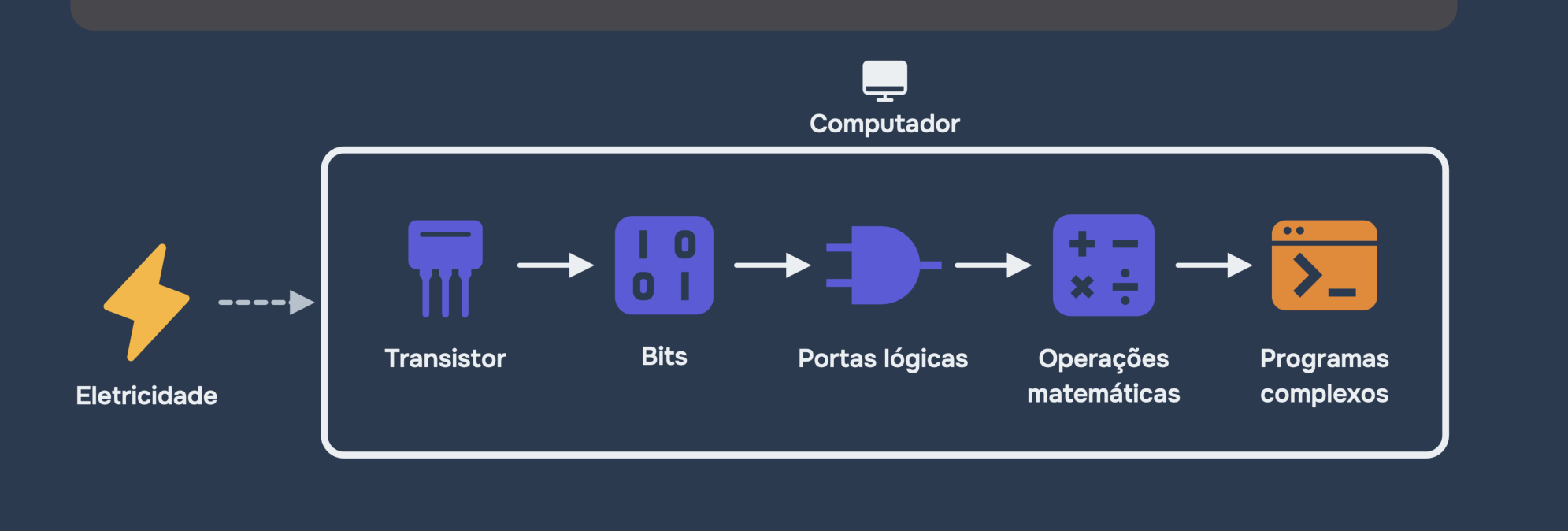
Notice that this is a concept map, not a literal picture of components lined up inside the computer. Transistors, bits, logic gates and operations aren't five independent physical boxes: they're different levels of explanation of the same system.
With that in mind, let's start with the smallest piece of this story.
2. Transistors: controlling electricity#
The first concept is the transistor. It's an electronic component that can be used to control the flow of current. For our reasoning, picture a switch that receives a control signal and, based on it, either allows or blocks an electrical path.
The interesting detail is that the control of this switch can be electrical too. In other words: one signal can control another signal. And when we combine lots of these devices, we can build circuits that make very simple decisions.
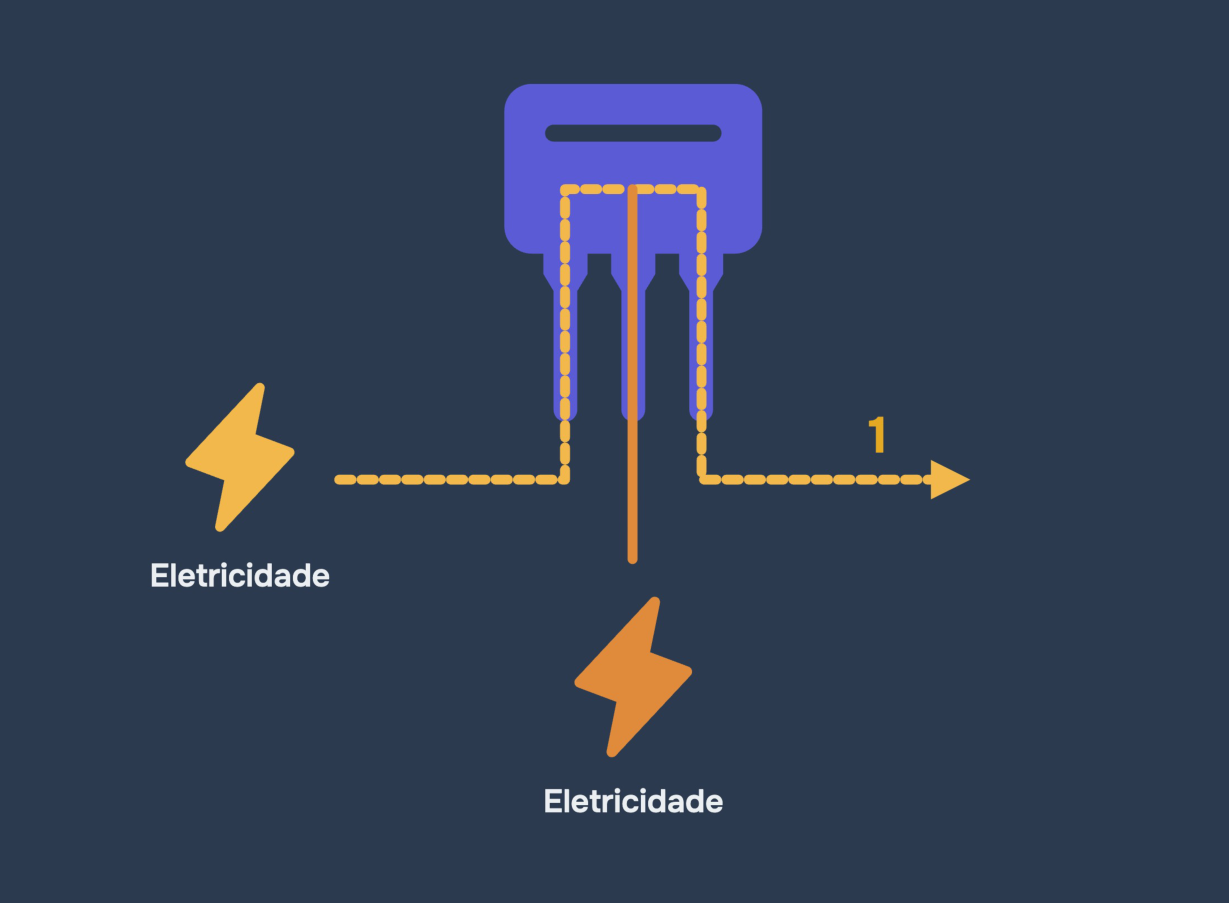
Let's play with this model before moving on.
Our next step is to use these two possible states to represent information.
3. Bits: giving meaning to signals#
Imagine a circuit that can tell two voltage states apart. We can map those states to two symbols: 0 and 1.
That's the basic idea of the bit (short for binary digit): the smallest unit of information in this model. A bit has two possible values. The computer works with circuits that can represent, store, transmit and transform those values.
It's tempting to think that “0 is a complete absence of electricity” and “1 is electricity flowing”. As a first picture, that even helps. But physically, what matters is how each circuit interprets voltage levels as logical states.
A single bit doesn't represent much. But we can put several bits together to represent more possibilities. For example, four bits can form sequences like 0000, 0101 or 1111.
Playing with numbers is just a first application. Depending on how we interpret a sequence of bits, it can be part of a number, a text character, an image color or an instruction.
So we arrive at an important idea: the computer doesn't need a different kind of electricity for each piece of information. It works with bit patterns and rules for interpreting them.
4. Logic gates: making simple decisions#
Now that we can represent 0 and 1, here's the question: how does a circuit actually work with these values?
By combining transistors, we build logic gates. Each gate takes one or more bits as input and produces one bit as output, according to a rule.
I'll use two gates to show how this works: AND and OR.
AND: both conditions must be true#
A two-input AND gate only outputs 1 when A and B are both 1. If either one is 0, the output is 0. To picture it with switches, imagine two of them on the same path: both have to be closed for current to flow.
OR: one true condition is enough#
A two-input OR gate outputs 1 when A or B (or both) is 1. In the switch example, picture two paths in parallel: it's enough for one of them to be closed.
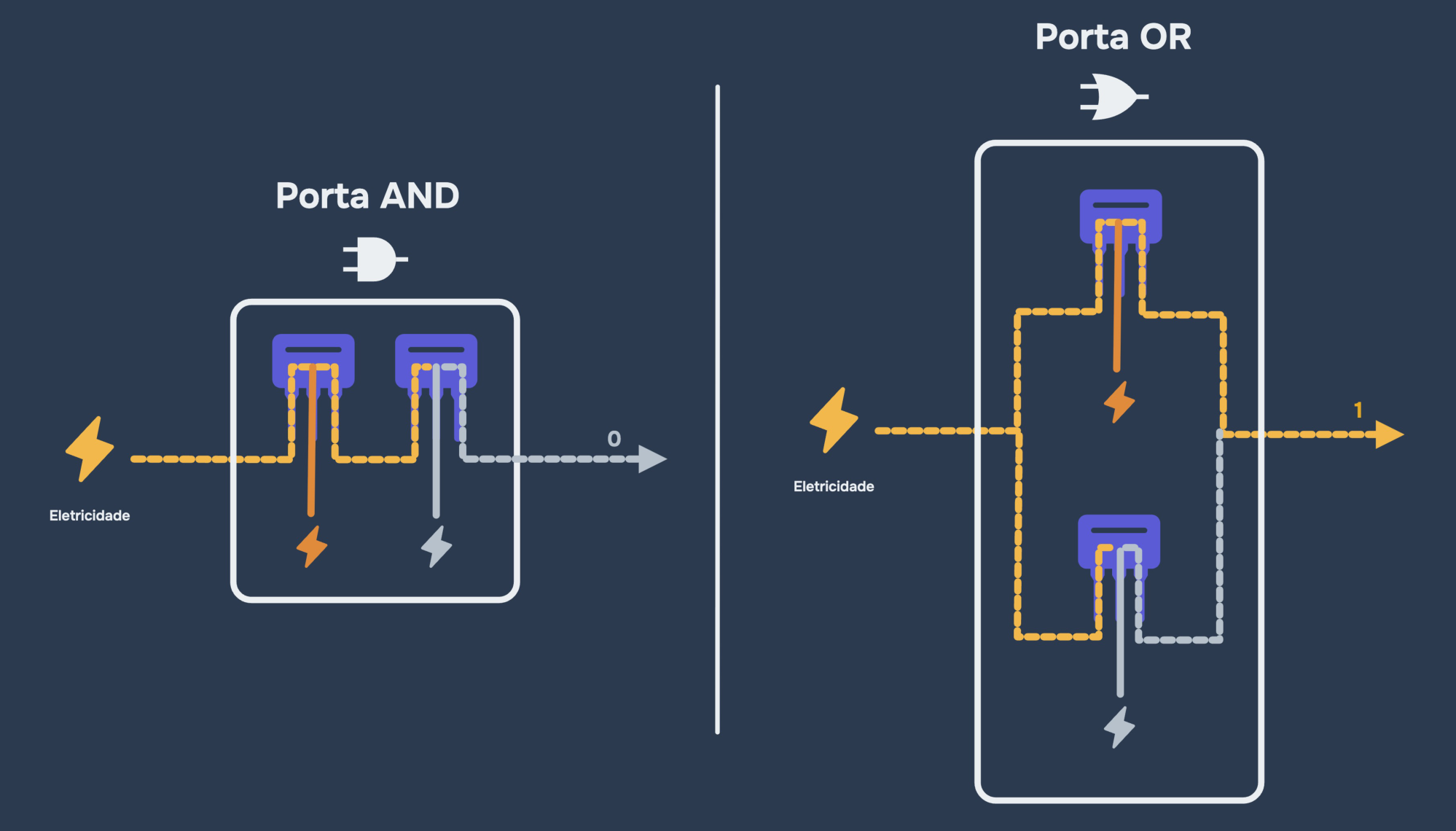
The next block compares the two rules using the same inputs, so the difference becomes obvious.
You might be thinking: “All this just to get a 0 or a 1?” Yes! The big insight is that lots of simple decisions, combined, make more elaborate operations possible.
There are other kinds of logic gates, and real circuits use different combinations of transistors. But AND and OR are already enough to see why we can make a machine process information from electrical signals.
5. From logic gates to math operations#
If we can do logic operations with bits, we can also build circuits that do arithmetic. For example, it's possible to build adders: circuits that take binary numbers and produce the result of an addition.
One of these cases is especially curious: 1 + 1, in binary, equals 10. That's not “ten” in decimal. The first digit represents one unit in the twos place; the second represents zero in the ones place. So 10 in binary means the number 2.
It's the same “carry the one” principle you already know from school math, except now we use two possibilities instead of ten.
The block does the math for you, but the important point isn't the calculation itself. It's knowing that there are circuits made of logic gates that can perform it. Binary addition uses combinations of logic operations plus a mechanism to carry values between positions.
Building on these ideas, a processor can run other arithmetic and logic operations. That's an essential part of a computer's ability to follow instructions.
6. But where do the bits live when we're not calculating?#
So far, we've talked about signals going through circuits and producing results. But the computer also needs to store information to use it later.
That's where memory comes in. Different memory technologies hold states that we interpret as bits. Some are very fast and small; others can hold a much larger amount of data. They don't all have to work the same way inside.
In my slides, I add “bit storage” to the explanation before showing how the CPU and memory are organized. The idea is simple: calculating isn't enough; we also need to remember results, instructions and data.
This simulator is deliberately tiny. Real memory handles far more information, usually organized in units larger than a single bit, and the details of reading and writing depend on the technology used.
But it already shows something essential: the CPU can fetch a value, use it in an operation and store a new result to look up later.
7. CPU, memory and code: putting the pieces in place#
We've reached the final picture of the lesson: inside the computer we have a CPU and different kinds of memory.
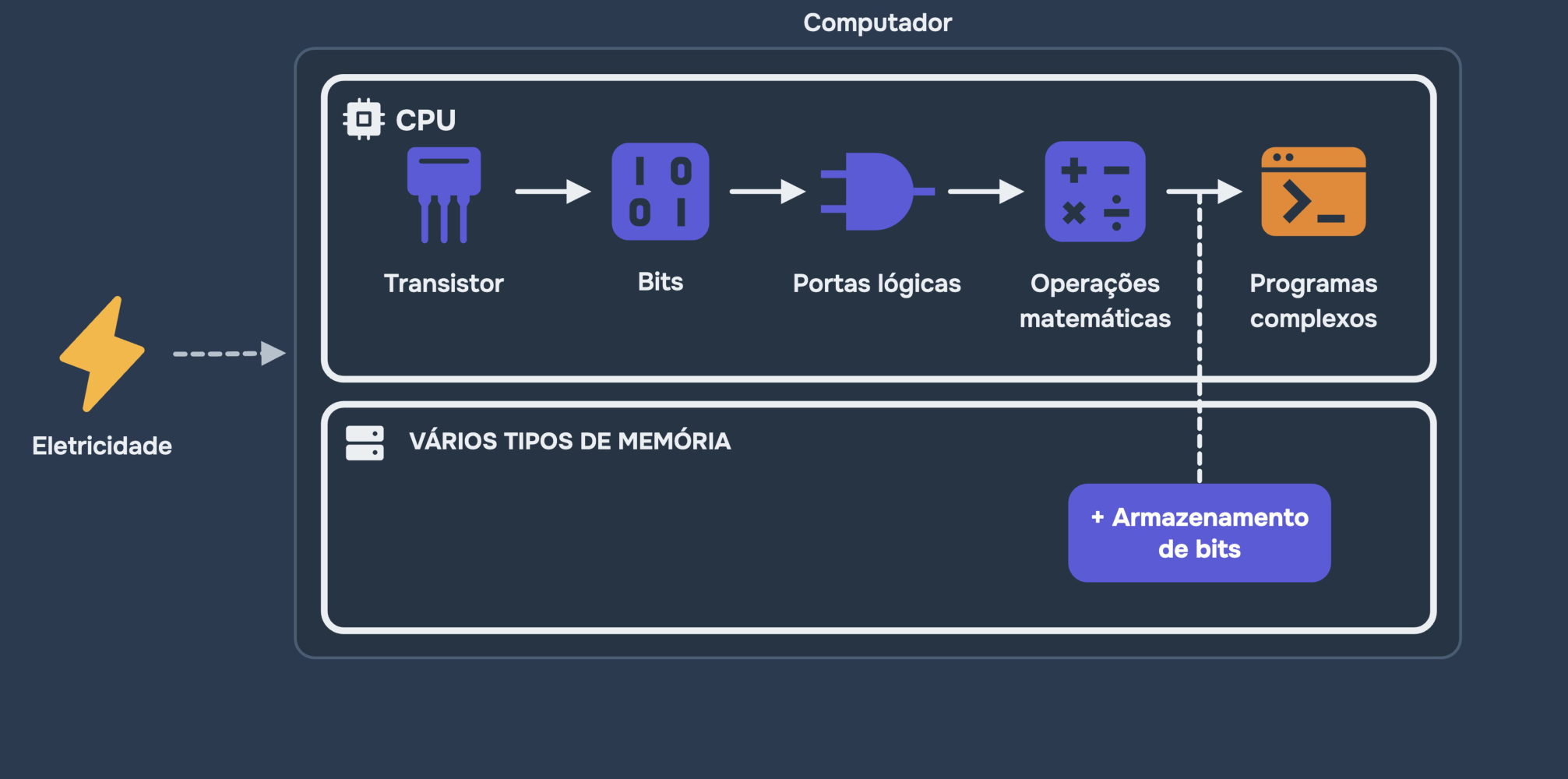
The CPU — Central Processing Unit — is the component that executes instructions and coordinates part of the processing. Its circuits can perform operations on bits, like the ones we explored.
Memory holds the data and instructions programs need to run. There's memory inside the processor itself, like registers and caches, and memory outside the CPU, like RAM. There's also persistent storage, like SSDs, which keeps data even after the computer is turned off.
It's important to separate two things that often get mixed up in our heads:
Source code: what we write in programming languages like JavaScript, Java or Python.
Executable instructions: what the processor can actually run, after the necessary translation or interpretation steps.
For example, I could write this code:
const a = 3;
const b = 5;
const result = a + b;

console.log(result); // 8
We see variable names and the + symbol. Underneath, the computer has to represent those values as bits and run instructions that use circuits capable of processing them. In JavaScript's case, there's also a runtime engine bridging the source code and the machine's operations.
So when I say a computer turns electricity into complex programs, I'm using an intuitive way to connect electronics with programming. More precisely, the computer uses electricity to represent and process information and run programs.
8. How does all this become games and apps?#
Now comes the coolest part. A game, an image editor and a messaging app look like completely different things. And they are — from the user's point of view.
But at the most fundamental level, they all depend on the same idea: representing data, executing instructions and producing results.
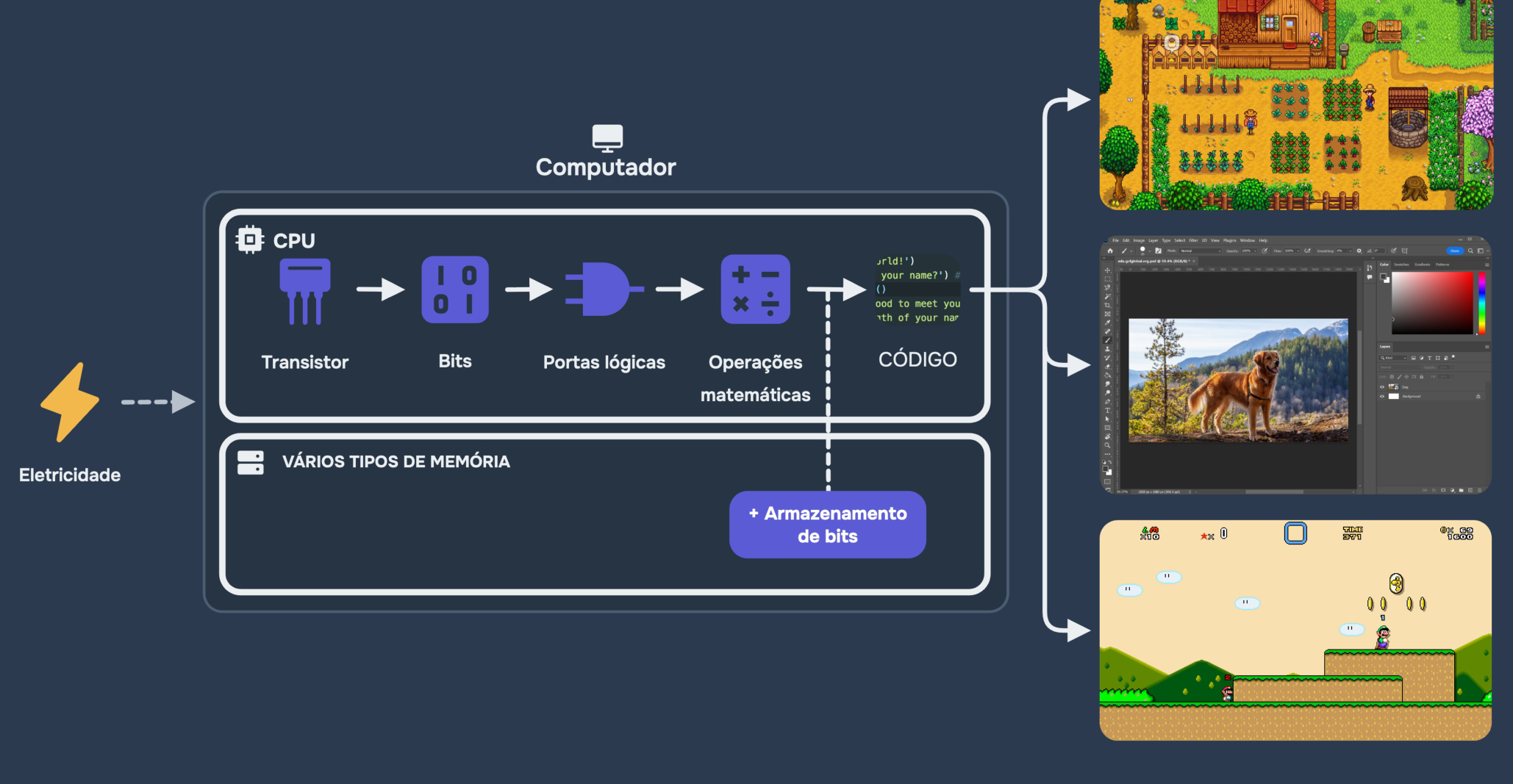
In a game, for example, the computer has to calculate positions, update the characters' state, decide what happens when a button is pressed and produce images. In a photo editor, it has to process the image data and apply transformations. The problems change, but the foundation of digital processing is shared.
Of course, a modern computer isn't just a CPU and memory. There are input and output devices, controllers, a GPU, storage and lots of other components. In this explanation I left those details out on purpose: my goal was to build the line of reasoning that connects electronics, bits, logic and programming, not to draw a complete machine.
Conclusion: it all starts with very simple decisions#
If I had to sum up what matters most about this topic, it would be this: a computer can do complicated things by combining extremely simple operations.
A transistor can help control a signal. Signals can represent bits. Logic gates manipulate bits. Circuits combine these operations to do calculations and execute instructions. Memory holds the information that processing needs. And, at a gigantic scale, all of this makes it possible to run the programs we use.
Next time you write an if statement, add two variables or open a game, remember there's an entire physical structure making those operations possible. For me, understanding that connection is one of the best first steps toward studying programming in more depth.